Local Inference with Large Language Models
To head off any criticism: not a word of this text was written by AI, all the mistakes are my own. If you should spot any I’d be very happy if you let me know.
This article assumes basic familiarity with the terminology around LLMs and the various moving parts, I’ve tried to explain as much as possible but in case something is unclear feel free to reach out and I’ll expand the article or clarify in an email.
Why?
Why make a setup to run an LLM locally if the bleeding edge is affordable and easily accessible?
I’ve been playing with LLMs since the first open models were released and even though at the time the results weren’t all that impressive it was clear that it wasn’t going to stop there. Over the last couple of years the model capabilities have improved at a breakneck pace and today these models are extremely capable when used appropriately. The business that I run sells a service to investors and companies that are looking to be acquired and is highly confidential in nature. Effectively we ask other companies to share pretty much everything, both the good and the bad with our team so that we can come to a balanced verdict in our report. To enable this sharing we sign NDAs (non-disclosure agreements) that usually have scary numbers in them in case we would breach that confidentiality, and rightly so, this kind of data is easily weaponized.
As part of our process we write reports, our ‘work product’ and these reports need to be proofread. The problem is that typically these reports are due on Friday evening and our draft version is usually only ready somewhere between 2 and 3pm on Friday afternoon. That leaves very little time for proofreading, usually we try to get one or two passes in before the document is handed to a customer but it isn’t rare at all that on second or third reading during the weekend we still find mistakes. These can be small and innocent or they could be larger (for instance: typos and grammar errors or errors in the content itself). Given infinite time I’m sure we would find all of these but we simply don’t have that luxury.
Now, the easy way out would be to upload the document just prior to sending it out to an AI service provider, have that service do the proofreading and then we would apply the corrections (there is absolutely no way that I would allow an AI control or direct input into our work process). But that would cause us to break our NDA. And that’s before we get into the hairy details of questions such as ‘Can we trust Altman or Amodei when they say they won’t use the data for their training?’, ‘Even if we can trust them, can we trust everybody who works there?’ and ‘And even if we can, are we sure that shipping these files out at all is a wise decision?’. The answer to the last one was the easiest, that was simply ‘No.’. So we decided to bite the bullet and do this locally.
We have some other reasons as well: we don’t particularly like the idea of a large entity vacuuming up the whole of human culture and then selling it back to us, no matter how nicely packaged and how useful it is. That feels like a very unethical thing to do and the providers of ‘open weights’ models are closer to how we think this should be handled. Second to that is that we don’t want to end up in a situation where an outside party has control over our workflow and can tell us what we are - or are not - allowed to do. ‘Sorry Jacques, I can’t let you do that’ is not something that I would ever accept from a computer, computers do what I tell them to do, not what they will allow.
These locally run models are not precisely as good as the big frontier models. They tend to be a bit smaller, sometimes a bit older and probably not quite as clever. But depending on your workload and other demands (such as confidentiality) they can be a surprisingly good match. And in case the likes of OpenAI decide to hack your server they may well be your only means of defense.
What do you need to do local inference?
If you want to do inference locally you’re going to need a couple of things:
- A piece of hardware powerful enough to do this on
- A model that will fit that hardware
- An inference engine that will push your input through the model to generate the required output
Let’s start with the last one.
Inference Engines
There are a small number of major engines suitable for deployment on your own hardware, a much larger number of derivatives (sometimes weakly derived, sometimes not much more than a relabeling) and then there are numerous smaller efforts. We only considered open source engines, and more specifically engines that we have actually used (benchmarked, and used in production). Let’s focus on the main engines first. These are the ones that we used that are either the ‘root’ projects or independent projects that have shown sufficient staying power that you could presumably build a business on them:
Llama.cpp
Llama.cpp (WP) is probably one of the easiest ways to get started with local LLMs. The project is now 3 1⁄2 years old, stable and extremely versatile. Installing it on a wide variety of hardware is usually a matter of cloning the GitHub repository and a single command to configure and another to build it. It’s not necessarily the fastest inference engine but it is super reliable and the quality of the code is quite high. Developed initially by Georgi Gerganov who now manages the project together with a team of seasoned developers. Georgi still contributes quite a bit to the code. We have used llama.cpp on pretty much all of our hardware and with a really large variety of models. Occasionally you’ll run into a lack of support for a model that has just been released but usually within weeks (sometimes days) these things are resolved. Llama.cpp is not usually the inference engine used by commercial entities, where the last little bit of performance weighs heavier than the convenience factor that Llama.cpp brings to the table. The project is named after the ‘Meta’ (ok, Facebook) model.
Good guides exist on how to get it working, the file format (.gguf) is widespread and conversion utilities are available in case a model is not shipped in a format that Llama.cpp can use. There are also groups specializing in converting and quantizing models to make them fit on particular hardware. Updates are a daily affair, it is usually a good idea to keep an eye on the GitHub page to see what they’re up to and whether or not it may be useful to you.
vLLM
VLLM is a powerful inference engine that is far more complex than most other engines. The downside of all this complexity is that installing, configuring and running it can be a significant task. The upside is that it tends to extract more performance from the same hardware than other engines, if that hardware is a good match for VLLM. If you intend to use VLLM you need to ensure that the hardware is a good match, usually by purchasing the hardware with the specific goal of running VLLM. Manufacturers of AI specific hardware may choose to support the ‘recipe’ for their hardware to ensure that VLLM runs well. This can be a shortcut to a powerful solution. But figuring this all out on your own can be extremely time consuming. VLLM is the inference engine of choice for many commercial LLM service providers. For them it is simply a matter of money, it is cheaper to invest the up-front effort and then to reap the benefits from a (usually marginal, but there are exceptions) system that performs better.
vLLM setups tend to be a bit more fragile, require more expertise and are less likely to function well ‘out of the box’. But if you are willing to spend the time, and already have some expertise this may well be a good match for you. VLLM configurations typically use the safetensor format that most models ship in from the model provider, so normally speaking no conversion step is necessary.
SGLang
SGLang sits somewhere in the middle between vLLM and Llama.cpp when it comes to ease of installation and ease of use. It usually squeezes a bit more performance out of the hardware than Llama.cpp but this comes at a price, we found that for our workloads on a pretty varied bunch of GPUs we did not see enough gain in performance to warrant further pursuit, but it is possible that we simply did not spend enough time to really unlock this engine. Installing it is a matter of running a docker container. This makes auditing what you are running a bit harder than with the other two packages (an area where Llama.cpp wins hands down because of its simplicity).
DwarfStar
DwarfStar is an inference engine produced by Salvatore Sanfilippo of ‘Redis’ fame. Salvatore is an extremely accomplished and productive programmer and DwarfStar is an interesting variation on the inference theme. Rather than make an inference engine for a hundred different models and 500 different hardware combinations he focused on (initially) a single model (specifically DeepSeek, aka DS, which is probably where the project got its name) and a Mac with unified memory. Since the launch many more platforms are supported as well as several more models. DwarfStar is easy to use and easy to configure, it is regularly updated with new features and/or performance improvements.
Ninfer
Ninfer is, like DwarfStar, a specialized engine. Initially made to run Qwen 3.5 and since adapted to be able to run other models as well it squeezes every last drop of performance out of a single NVidia 5000 series GPU. If your setup matches that description then this is most likely the best engine for you assuming your model is available as a ‘.ninfer’ artifact (beware, there are multiple versions of these that are not backwards compatible so you’ll have to convert). Ninfer is in active maintenance and, interestingly, there are already many forks for hardware that is similar but not identical to the hardware that ninfer was originally developed on. For instance, there are forks for the 3000 series GPUs (which includes the venerable 3090, which is still a powerhouse, especially given its age) and the 4000 series as well.
Does it matter which engine you choose?
Well, it does and it doesn’t. As long as the engine exposes an OpenAI compatible endpoint you don’t necessarily care all that much about which engine you are running, as long as (1) it runs well, (2) performance is acceptable and (3) your model of choice is supported.
The Models
There are thousands (if not tens of thousands) of different models. These range from general purpose models targeted to specific sizes of VRAM or some other inference time limitation to models tuned for a particular application. The main factors distinguishing the models from each other are:
- The number of parameters (anywhere from 1B to > 1T)
- Whether the model is ‘dense’ or a ‘Mixture of Experts’ (‘MOE’)
- Whether the model has a built in chaperone or not (the term to look for is ‘Abliterated’)
We could not possibly list them all, but at the time of this writing there are a couple of these that deserve special mention here:
The ‘Qwen’ family of models
The Qwen family of models is interesting because they span a range of capabilities and sizes, from small (7 GB or so, small enough for even the smaller video cards) all the way to 400GB and by virtue of quantization many different sizes in between. One of our workhorse models is Qwen 3.8 27B, we use this model for coding and robotics experiments (not the original application of our AI rig, but now that we have it, why not…).
Deep Seek
DeepSeek is a very impressive model, in fact, it was the first release of DeepSeek that prompted us to make the next step with this project because we considered the quality ‘good enough’ for our use case. It is not necessarily the best model overall but it strikes a good balance between speed and size and is quite versatile.
GLM
GLM, in particular GLM 5.3, is an extremely capable model. It is also the largest model that we can still comfortably run on our hardware. Due to its size it is not super fast but it more than makes up for that in capability, so much so that it can perform better in wall-clock than smaller models that will use many more tokens and/or many more turns to get the same job done. GLM 5.3 is also very good at cyber related tasks. To this day it has never refused an assignment.
This is the model that we use right now for our in-house proofreading project and we have started using it for other purposes as well.
Does it matter which model you choose?
Absolutely, the choice of model is probably the most important choice you can make when you decide to do local inference. If at all possible test-drive all of the models you are considering, and don’t limit yourself to the ones above, these are simply the ones that we use most frequently but there are many, many others besides that may be more suitable for your purpose. If you are knowledgeable about this stuff you have probably already noticed that all of the models mentioned above are Chinese. This is no accident: China is after the United States the AI powerhouse and because they can’t or don’t want to compete directly with the big US service providers they’ve decided to open up their models. Yes, that’s right, commercial entities are sharing their work product for free with the world. Predictably, the response from across the Atlantic (or the Pacific, depending on your point of view) has not been kind and there has been an endless barrage of fearmongering, attempts at regulatory capture and other shenanigans in an to attempt to lock in the market for the United States. We believe that when being given the choice between running a ‘top of the line’ model but giving our data to parties that will no doubt use it against us and running things locally, we believe we’re doing the right thing by picking the latter. If Chinese models are not an option for you then there are still many options left. But the Chinese models are hard to beat both in price (you really can’t beat free) and in performance, as long as you steer clear of sensitive political content they should be fine.
Hardware
So, now for the meat of the matter. The inference hardware. This is where things get complicated and expensive in a hurry. Well, what’s expensive. If you had offered me a black box with a power cable, an ethernet connection, 3 KW of power consumption and the capabilities of any of the models mentioned above you could have named your price and I would have bought it. The business angle is very obvious and we (my colleagues and I) are running a business, so the decision to spend some money on these capabilities is an absolute no-brainer. At the same time: what do you get for all that money?
Let’s look at a couple of use cases:
hobby / home use
small business (say single proprietor, maybe a legal practice with one or two lawyers)
larger business (5-500 employees, one or more teams)
Note that for all of these scenarios from an economic perspective it is cheaper to use a hosted service provider, but I trust you have your own very specific reasons for why you want to do this under your own banner.
Hobby or home use
If you are looking at doing this for hobby reasons, to learn more about LLMs and/or to play around with them in different application settings fully under your own control, or maybe to develop some software that closely integrates with the LLM (for instance, a custom agent) then you are probably going to be using a single GPU and a ‘fat’ PC with as much RAM as you can stuff in it. 32GB and a 16GB VRAM GPU are probably the lower limit of what is usable, anything bigger than that and you will have more speed and/or a more capable model. With a nice gaming PC (and paired with an equally nice GPU) you could have a very capable setup well under $10k, assuming you are buying new or refurbished hardware.
Small business
For a small business the situation is not all that different from the hobbyist situation. You probably will have an easier time justifying the investment and you may have an actual business reason to do so rather than just curiosity or the ability to develop software closely tied to the LLM itself. More likely you will be integrating the LLM ‘as is’ into your workflow to work with documents, help with writing and/or to assist with QA. That fat PC and GPU mentioned above will still be a good starting point, but given that this is a business expense you will likely have more money available than the typical hobbyist and you’ll be able to afford more RAM and more VRAM so you’ll be able to run larger models. $10k is again roughly the entry level, you can go up as far as your budget and ambition allows.
Larger business
This is where it gets complicated. If you already have IT staff then configuring and maintaining an in-house LLM setup is probably best farmed off to the people that already know how your business operates from an IT point of view. A large dutch Legal services firm did just that and is spending a substantial amount of money on their internal AI project. Effectively the sky is the limit with such projects. But depending on how large your operation is you should expect to spend between 5 and 10K per person that uses the system, and as the setup grows you will begin to see some economies of scale.
GPUs
We only have experience with one brand of GPU, NVidia. In our own lab we have various GPUs, 3090’s (6x), 4000’s (6x) and some odd ducks, notably two DGX Spark AI mini pc’s. All of these were bought second hand with the exception of two of the 4000’s and the DGX Sparks.
RTX 3090
The 3090 is - in spite of its age - still a very powerful GPU. It’s a bit power hungry relative to the performance but the memory bandwidth is very impressive and there are peer-to-peer and other performance hacks floating around that will get you a large amount of bang for your buck. The second hand prices of these (you can no longer buy them new) are as high or higher than the original new price, which is something that does not normally happen with computer hardware. There are many different versions of this card, some with power limits as high as 450 Watts and with various kinds of cooling systems (water cooled, air cooled, with a ‘blower’ style fan or with regular fans). I personally prefer the Asus ‘Turbo’ blower style version, it is only two slots wide instead of three and it seems to stay cooler than the others at the same ambient temperature. I power limit the RTX 3090 to 275 Watts, this gives a bit less performance but far less heat and I hope that extends the life of the cards. All of these have 24 GB of VRAM.
RTX PRO 4000 (Blackwell)
There are multiple RTX PRO 4000 series GPUs so beware you’re not buying the older ones (unless you are looking for those specifically). The RTX 4000 Blackwell is a very handy GPU because it is a single slot wide. This allows you to either cram in a lot of them in relatively little space (beware of cooling issues!) or you can space them out so they have a bit more air to breathe (and the slots in between can still be used). These cards sip power compared to the older 3090’s, offer roughly equivalent performance (in spite of having much lower memory bandwidth) and are still available new (at a price though, roughly 2x what you pay for a used 3090).
RTX 4090 (Ada Lovelace)
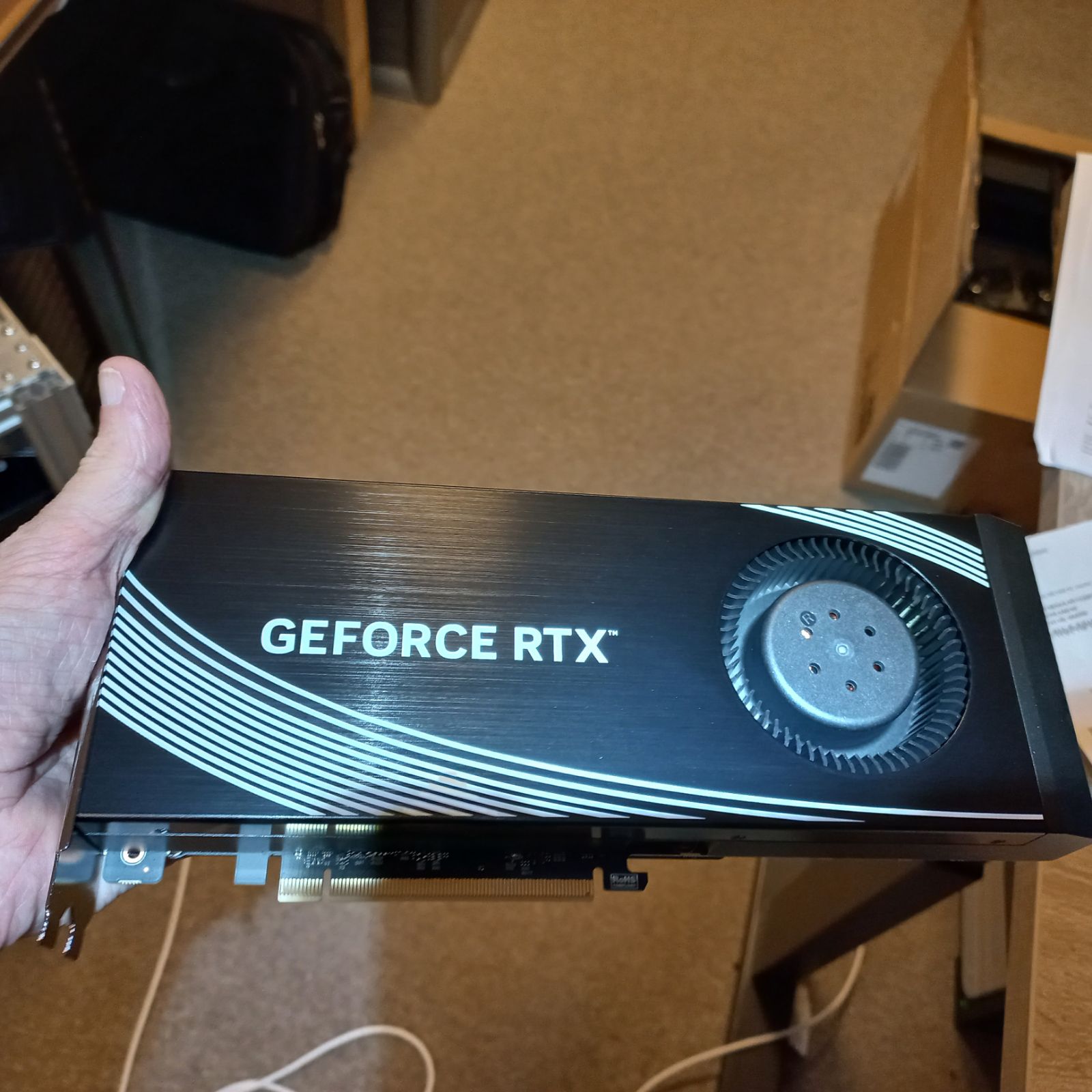
The RTX 4090 is a lot more powerful than either the RTX 4000 or the RTX 3090, even though it is older than the RTX 4000 Blackwell series. The key is the generation difference with respect to the 3090 and a massive power budget compared to the 4000. You can expect ~50% more speed from these cards. An interesting twist to the whole 4090 saga is that Chinese re-manufacturers have figured out how to double the VRAM on these cards, so you can buy ‘new’ cards (with a used GPU and probably used VRAM but a new board and cooling system) that have 48GB of VRAM. The originals have 24GB. Note that these souped up cards are not sanctioned by NVidia and that there are issues with the BAR1 window being smaller than the available amount of VRAM and not all engines are smart enough to compensate for that, especially not when using peer-to-peer transfers between cards.
Other GPUs
There are many other GPUs, but the ones above are the ones that we have and that we have used extensively. We haven’t had a single GPU die yet so they’re pretty tough (in spite of running them pretty much day and night under varying loads for a long time). Other interesting options are the RTX 5090 (which right now is approximately worth its weight in gold), the RTX PRO 6000 Blackwell MaxQ (which has 96 GB of VRAM, but costs as much as a mid sized car) and some more exotic ones such as the V100s (older but still very capable), the GB200 and the GB300 (high density data center GPUs, extremely powerful, extremely power hungry, will probably require babysitting and a server room). Then there are AMD which make some very capable GPUs, Intel, IBM and more specialized hardware, but which you are unlikely to encounter in the wild.
DGX Spark
The DGX Spark is an interesting development. We have two of these and they’re pretty capable little machines. Each Spark has 128G of unified RAM, a Blackwell series GPU and an ARM CPU. All of this is squeezed together in a tiny little box. They’re getting more expensive by the day (last I checked about $8K, we got ours a lot cheaper than that). They’re not the fastest because even though on paper those specs look absolutely amazing they have only ~275 GB/s memory bandwidth, which is 1/3th of what that much older 3090 brings to the table. So performance is lacking. But they are quite convenient and they will run relatively large models. You can gang them together using a high speed interconnect. This is useful but the experience is not as seamless as with multiple GPUs connected to one CPU and besides that it isn’t really much faster than a single Spark. But it does get you the capability of running larger models with a minimum of fuss.
The host
Hosts you can configure pretty much any way you want, but there are a number of things you will want to watch out for: try keeping the amount of RAM that you have at least as large as VRAM and largest model size with some room to spare. For hobby use 32 or 64G, for professional use 128G and up (if you can afford it…). This will really help with loading models quickly and it will also help you shuttle bits of the model in and out of the GPU(s) at speed. A fat CPU helps as well, we use an AMD Threadripper PRO 5955 which has plenty of PCIe lanes (this can be a serious showstopper on some intel based hardware) and a motherboard that has seven slots. Make sure your BAR1 resizable setting in the bios is enabled and that you allow for > 4GB decoding on the PCIe bus.
Typically motherboards will allow up to 14 GPUs before they start refusing to enumerate more of them. This, and the physical size of your installation (our original ‘Frankenrig’ had that many GPUs and it was absolutely unmanageable) are things to consider and it may well be worth it to get fewer, larger GPUs than many more smaller ones. Some people have managed to get 16 GPUs to work but they did not give any pointers on how to achieve this.
You also want the fastest and largest NVMe drive that you can afford. This will help tremendously with model start-up time and if you are going to run even larger models than what fits in RAM you can use that capacity to stream the model weights in as required. I would not recommend such a setup for professional use though.
More GPUs than you can fit in the box
This is where things get tricky. At some point your desire for VRAM and/or Compute capabilities my outstrip the space in a single enclosure. This is a huge bottleneck and many people stop right at that point. There are a couple of solutions to this problem and I’ll sketch them both below.
Risers and splitters
PCIe, the bus that is used to tie all these parts together is incredibly versatile. What you think of as a way to plonk expansion cards into a motherboard is actually an extension of the CPU that is more like a local network of parallel connections than that it is just a point-to-point link between the CPU and a card. The practical upshot of this is that you can add more than one card in the same slot. Ok, you won’t be able to do so physically, after all the GPU exclusion principle prohibits two cards from occupying the same space. But what you can do on some motherboards is to tell the board to ‘split the lanes’. A full sized slot is x16, so 16 parallel lanes. You can hook up two cards, one using x8 to one device and the other x8 to the other device. Both will run at correspondingly reduced bandwidth but if your original motherboard had 7 slots using this trick you can now run 14 GPUs (this was our original Frankenrig). Mechanically it is going to be a bit messy. If you want full speed another alternative is to use slim (single slot) cards like those RTX PRO 4000’s mentioned above, and then to put riser cables in the slots in between. These riser cables can be x16 and then you can stuff 4 slim cards and 3 full sized cards into the same box at full speed. Again, mechanically this is a bit of a hassle, but it can be done. If you’re in Europe there a little company called C-Payne that sells quality hardware for this purpose, we’ve bought plenty of their gear and all of it is top notch.
Switches
Switches are an absolutely brilliant way of expanding the PCIe bus from a computer. There are a couple of advantages, this setup will be far more stable mechanically than anything involving risers or splitters. In theory you can expand this as much as you want (BIOS enumeration limits still apply though, let me know if you know a way around this), and it also solves another problem, which is to power that many GPUs responsibly.
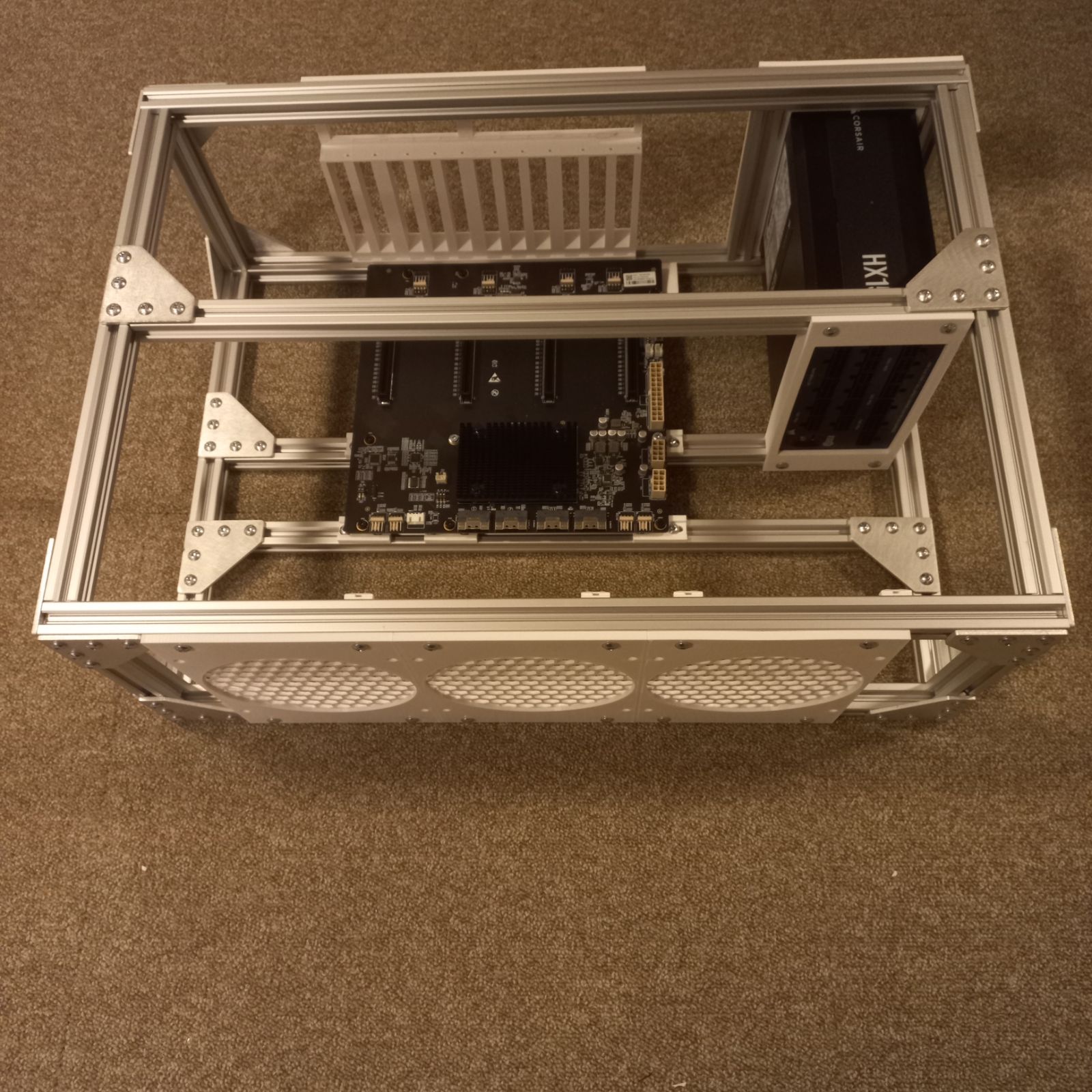
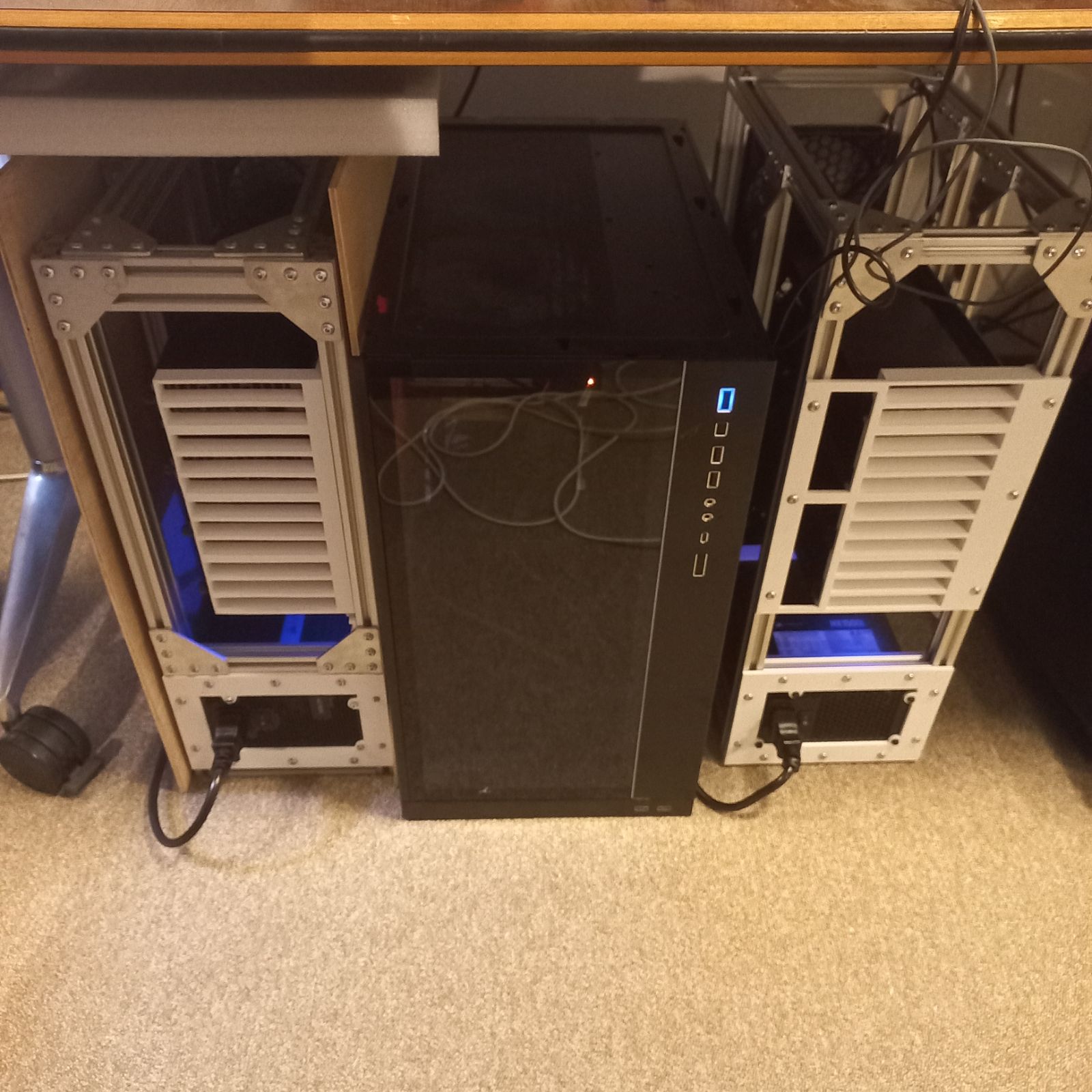
This is the road that we took with our current installtion. We have a big CPU box with 4 GPUs in it, then an expander card that connects to the switch board. The switch board has its own PSU and hosts the second set of 4 GPUs. Besides the power problem this setup is also much, much easier to keep cool than to have that many GPUs in a single housing.
The switch board we use is made by Chinese company ADT. The quality of the board is very high and it works out of the box with Linux, no drivers are required. ADT sells all kinds of other goodies as well for PCIe wizardry, but this is the only component we use from them at the moment.
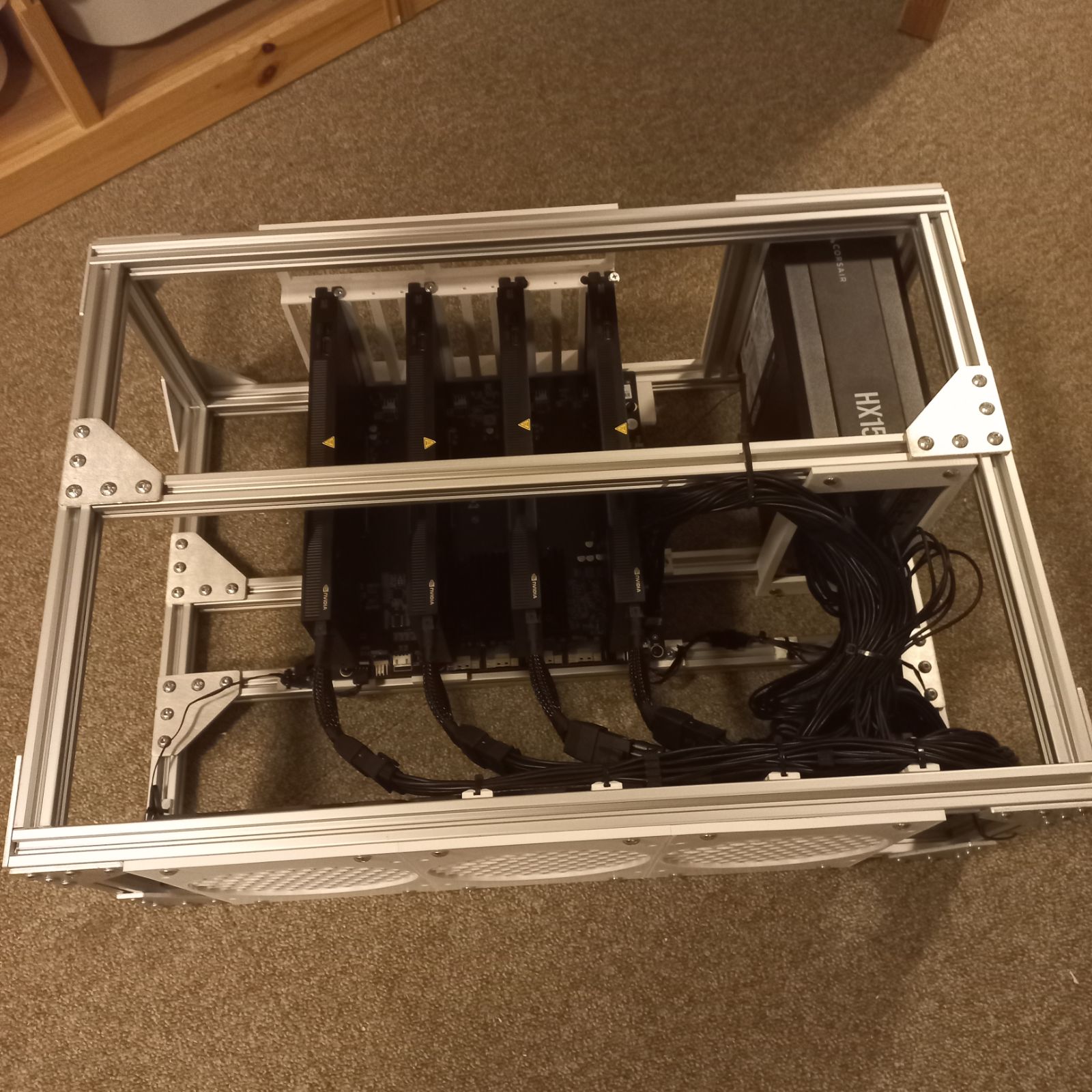
There are other boards in this category, they sell a 5 slot board and there is also ‘Utran’, who sell an even larger one. These boards are not cheap, about $1000 give or take and you’ll need to build an enclosure for them because the spacing between the cards is non-standard. I made a quick-and-dirty frame out of some 2020 aluminum that I bought in Poland, putting it together is something anybody that can build a Lego set can do. To hold the cards, the powersupply, the fans and to mount the board to the box I 3D printed a bunch of parts. If you want copies let me know I can have more of them printed easily enough (probably not worth the shipping if you are in the USA).
Putting it all together:
The Frame
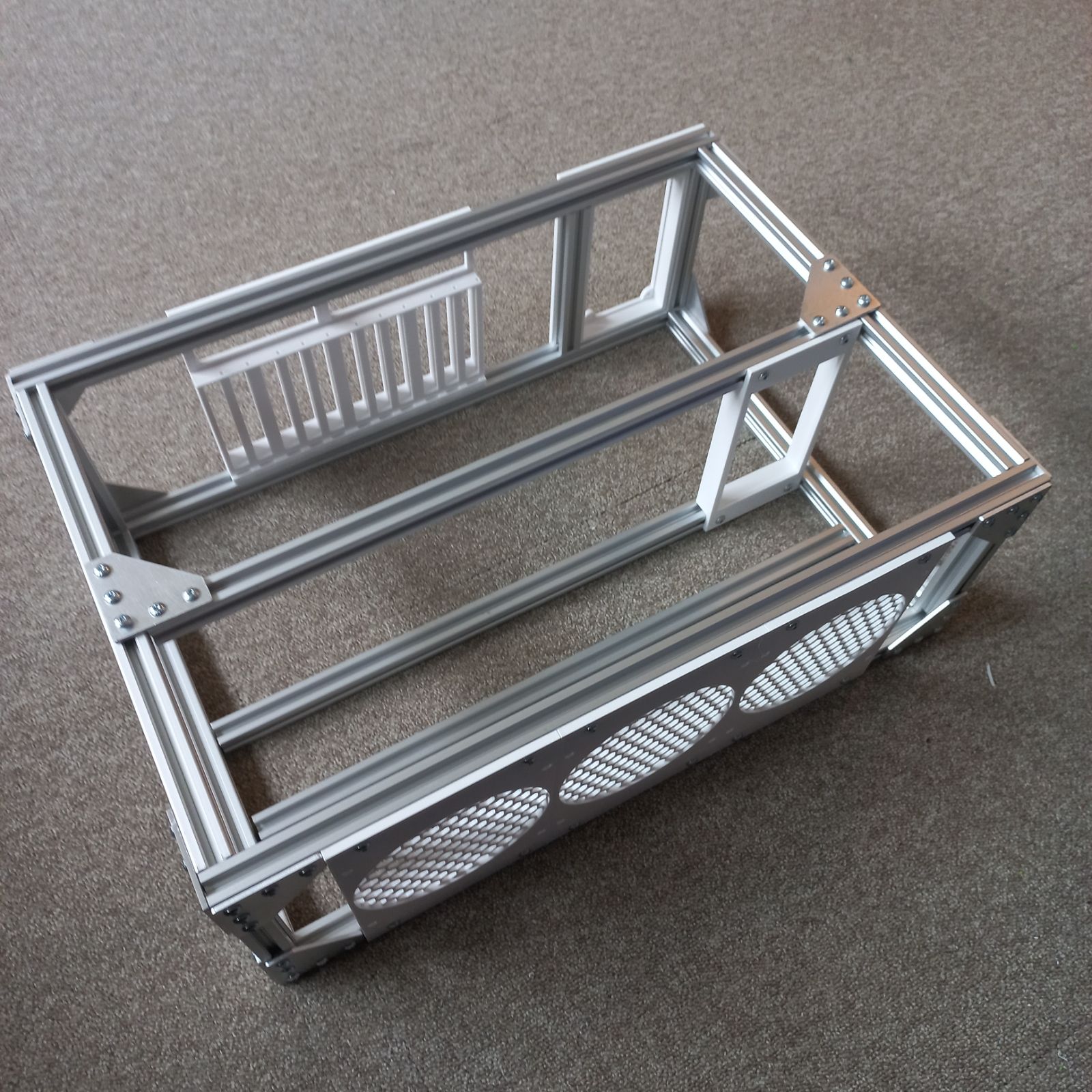
PSU mounted
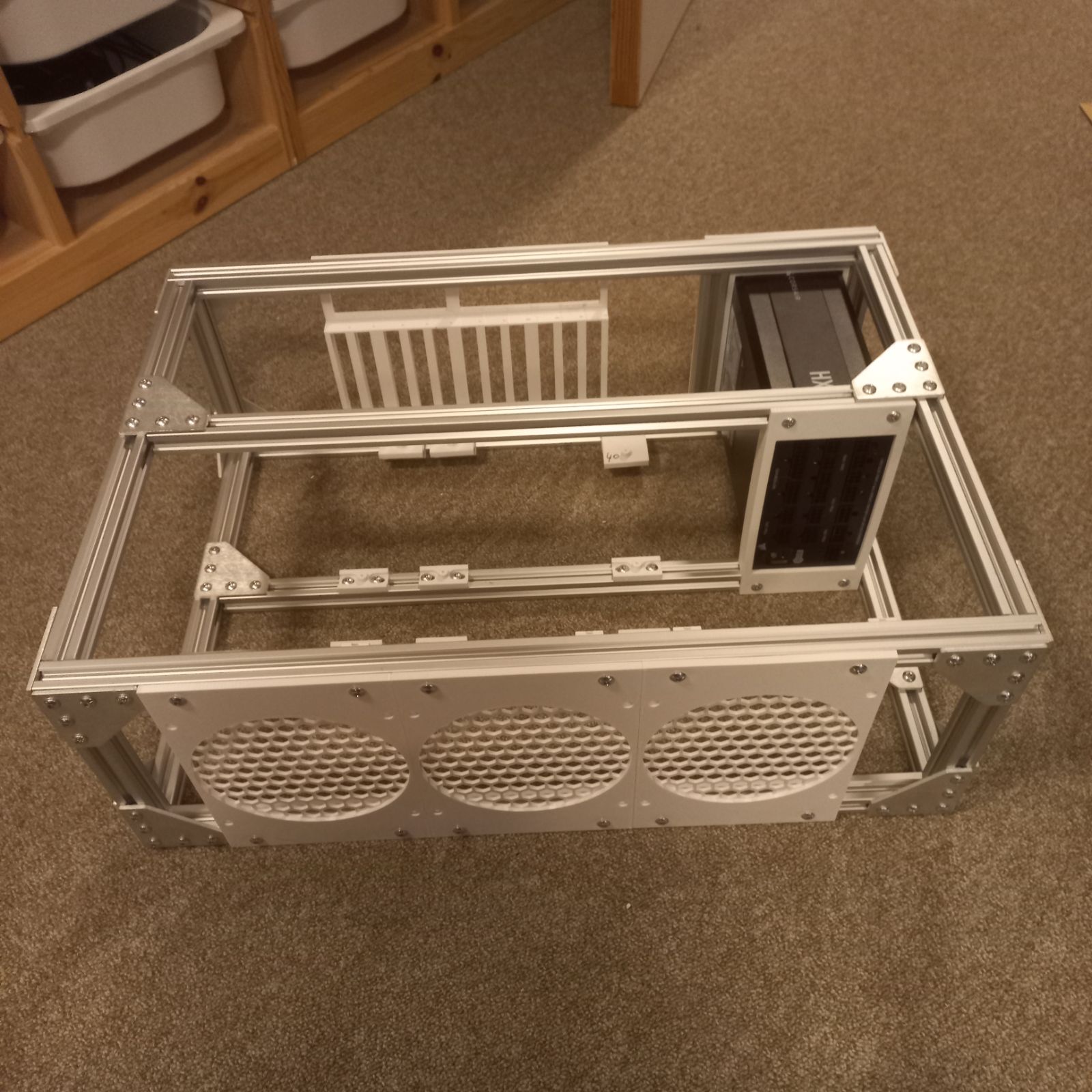
Switch board mounted
48 GB Remanufactured ‘white label’ RTX 4090
Four GPUs on the switchboard:
Two PCIe expanders next to the host computer:
And when you’ve done all that you will see something like this:
  |   0  NVIDIA RTX PRO 4000 Blac...    Off |   00000000:01:00.0 Off | Off |
  |   1  NVIDIA RTX PRO 4000 Blac...    Off |   00000000:2C:00.0 Off | Off |
  |   2  NVIDIA RTX PRO 4000 Blac...    Off |   00000000:41:00.0 Off | Off |
  |   3  NVIDIA RTX PRO 4000 Blac...    Off |   00000000:61:00.0  On | Off |
  |   4  NVIDIA GeForce RTX 4090        Off |   00000000:66:00.0 Off | Off |
  |   5  NVIDIA GeForce RTX 4090        Off |   00000000:69:00.0 Off | Off |
  |   6  NVIDIA GeForce RTX 3090        Off |   00000000:6D:00.0 Off | N/A |
  |   7  NVIDIA GeForce RTX 3090        Off |   00000000:6E:00.0 Off | N/A |
Epilogue
What does it cost?
The total cost for the system in the picture above is ~$25K. That includes 256GB of RAM, 8 GPUS with a total of 240GB of VRAM, two very fat power supplies (1600W each), the Ryzen 5955 CPU, a motherboard and all of the cables, mounting hardware etc. Not cheap, I’ll admit. But then again: in 1995 I paid a similar amount of money for a decked out workstation and once upon a time I bought a laptop that was half this price. Computing hardware is - and probably always will be - expensive. I doubt you could build this system for the same amount of money today, the prices have gone up considerably for the GPUs, to the point that some of them are now effectively unobtanium. The four RTX PRO 4000’s alone would run to half of the total today.
What does it do?
Running 8 concurrent Qwen 3.8’s using ‘ninfer’ each of which is running 8 slots you can get a few thousand tokens generated per second. Prefill is ridiculously fast, 2K tokens / second, time to first token on shorter prompts is instantaneous (too short to measure, really) and on longer prompts (such as a long document to proofread) mayb 20 seconds or so.
GLM 5.3 is slower, much slower. By itself it occupies all GPUS. There is a little bit of room to spare but not all that much:
  |    0   N/A  N/A           26087      C   build/bin/llama-server                13456MiB |
  |    1   N/A  N/A           26087      C   build/bin/llama-server                22700MiB |
  |    2   N/A  N/A           26087      C   build/bin/llama-server                22700MiB |
  |    3   N/A  N/A           26087      C   build/bin/llama-server                19234MiB |
  |    4   N/A  N/A           26087      C   build/bin/llama-server                41456MiB |
  |    5   N/A  N/A           26087      C   build/bin/llama-server                37328MiB |
  |    6   N/A  N/A           26087      C   build/bin/llama-server                22656MiB |
  |    7   N/A  N/A           26087      C   build/bin/llama-server                24044MiB |
The number of tokens generated per second is anywhere between 50 and 100 depending on how well the speculative decoder does it’s job. Unfortunately llama.cpp does not really get the maximum out of this setup yet, GPU utilization is fairly low while it is running. Prefill is reasonably fast at 500 tokens/second.
Power consumption is obviously nothing to be proud of. Running flat out this rig would consume well over 3 KW. I’ve power limited the 4090’s and the 3090’s so things are a bit more civil now but still, it’s like having a very fancy space heater. There are a lot of solar panels on this building so that helps considerably (but only during the day).
The Problem
There is a problem in the ‘infosphere’. In a nutshell: we now have high quality text that has low, zero or even negative value for the reader. Authorship is no longer something you can trust implicitly, even science is not immune to this and the problems seems to be set to become significantly larger in the near future. You could solve this by mandating authors label their work product but if there is money to be made by mis-labeling then you can expect people to do so.
Wikipedia has been fighting this trend for many years, they position themselves as a tertiary source: they will require references from secondary sources and those secondary sources should report on primary sources. This serves as an input filter of sorts because the assumption that secondary sources are going to do their homework was a good one. Until now.
Secondary sources are now incentivized to no longer do their homework. Just about every secondary source now uses automatic ways to generate content where it seems quantity, rather than quality has become a driving force. This is the equivalent of replacing quality home cooked food with fastfood: it is much easier to produce low quality food in quantity than it is to produce high quality food in quantity, if it can be done at all.
AI is a force multiplier here: it allows for the generation of immense quantities of very good looking text but with low quality. The information diet equivalent of fast food. And unlike fastfood, which usually is at least nourishing even if it isn’t the best of foods, the AI work product as a rule is poisonous: it contains ‘hallucinations’, which when allowed to take root can cause false information to spread widely. Now, it could be argued that fast food is when taken in quantity also poisonous so maybe the analogy is stronger than I intend for it to be. But the fact is that a single hamburger is not going to kill you. But a single falsehood just might, especially when the subjects are health, technology, engineering and so on.
Of course ‘unassisted humans’ also make mistakes. But we have ways to deal with that: reviews and editors. At the quantity of information produced that is manageable. But with the volume of automatically generated text exploding and absolutely dwarfing our combined work product it is a matter of time before the ‘slop’ will outnumber the combined human product by a considerable margin. Humans won’t be able to review or edit any of that simply because there wouldn’t be enough humans to do and besides the whole point seems to be to not employ all of these humans in the first place.
A possible solution
There are a couple of solutions but they are all going to rely to some degree on collaboration, ethics and honesty, both corporate and individually. If the advertising industry has taught us something then I guess that we do not have to hope for this to be successful. And bad actors will be able to put one over on good actors by gaining an unfair advantage. And since we only seem to want to punish people who gain an unfair advantage in life by clobbering old ladies over the head to make off with their handbags I have little hope that this will succeed. But I still think it is worth trying because the idea of giving up what we’ve achieved so far seems to me to be too high a price to pay.
AI - obviously - has its place. It can help us to have a personal teacher - who you can’t quite trust not to pull the wool over your eyes - with access to a vast amount of information. But as soon as you hit the ‘prompt / generate / cut / paste / profit’ cycle you are no longer operating from the same playbook as the rest of humanity: you are passing off the AIs work product as your own, whereas all you did was to create the prompt. And that’s fine, but then you should at least be transparent about it.
In order to help AI companies to create better products it would be good if we could create the digital equivalent of a sworn statement of authorship. I can see several ways of doing this and one in particular has my fancy because (1) it scales and (2) it would be very easy to implement.
Classification
Let’s start off by grading the different kinds of works
Original works. These are 100% human created, there is absolutely no question about the provenance of the text. We know who the author is, the author has made a clear statement of provenance and there is no reason to doubt that statement.
Assisted works. These are hybrids: the author has put considerable work into the text but has used AI to either stylistically improve the work or because some of the text has been AI generated. Ideally that would be a minority, as soon as you cross the 50% mark you will be in the next class.
AI generated, human augmented. These are hybrids too, but from the other side. Now the balance has shifted to majority AI input and minority human.
AI generated. 100% AI generated, no human input required.
One way to be able to distinguish what is human written and what is AI written would be by extending the Unicode character set with a complete duplicate and to legally mandate that all AI companies are only allowed to use this character set for their output. Transliteration to the human set would be strictly forbidden and should result in some civil penalty. Shipping an AI model that does not output in this transliterated set would result in a criminal penalty.
That’s harsh, yes. But I think that there is enough at stake here that this kind of measure is more than warranted. And AI companies have a huge incentive to play ball here: for one their execs would likely not want to be found engaging in criminal acts, for another they would be able to avoid that one thing that they’re all struggling with: to avoid eating their own (and each other’s) tail. Because AIs trained on slop will eventually degrade to the point where progress will stall or even reverse. Pre-AI text will have roughly the same value as low radiation steel (https://en.wikipedia.org/wiki/Low-background_steel). By labeling their output in this way AI companies will be able to sift out their own and other AI companies’ output.
Finally, a human run attestation service could be run: a sufficiently secure cryptographic hash run on a piece of input text that measures the ratio of AI vs human generated text in the input could give a meta label that can easily be affixed to the content. Search engines and AI ingestion could then use these marks to differentiate between various sources and hopefully use this as a degree of measuring quality and giving higher quality results priority. So you don’t accidentally end up biting into fast food when you were expecting something much better.
Problems with the above
Of course, it is easy to dismiss this all out of hand because it isn’t - and won’t be - perfect. I can already see many sub-problems that will need to be resolve and the knee-jerk reaction will - of course - be that the race is already run and it is much too late to do something about it now so we may as well lie down and be run over by the bulldozer.
But I’m an optimist by nature: I think we can recognize that even if this plan is flawed the spirit of it has merit, fix the flaws and then implement them to the best of our ability. It’s the spirit that counts here, not the letter, so let your imagination loose on taking the idea and improving on it rather than to bash it with the first middlebrow dismissal that comes to mind.
–
This text was written by hand, using a brain and a computer in the most passive way possible, to record keystrokes. No automatic processes contributed to the content. AI percentage: 0.
I’m impressed
For the last couple of years, my colleagues and myself have been playing around with AI. I can’t speak for them but from the perspective of a casual user I am very much impressed by the capabilities on display. If you dedicate some time to it you can get a lot of mileage out of AI, it can help you in the way a highly interactive book would help, with vast amounts of knowledge at the tips of your fingers. As long as you are wary of the inevitable hallucinations and the AI’s tendency to get stuck in loops. Because the one thing that we have not yet managed to program in there is the ability to be humble: to realize that no matter how much knowledge you’ve got you don’t know everything. So “I don’t know” is not on the menu. It is not the kind of thing I have seen as output from the various AI offerings.
If you had told me ten years ago that we would be having conversations with a machine at this level today I would have thought it to be impossible, and yet, here we are. The ‘Attention is all you need paper’ combined with Hinton’s persistence paid off immensely, probably more than even the people behind that effort had expected. Current generative AI is able to converse on an immense variety of topics at a reasonably high level.
Professional use
Even so, I would never use its output in a professional setting. When we are hired to do work we are hired to do work, not to come up with prompts and then to let the AI do the work. Anybody can do that, it would feel like fraud to use AI as some kind of shortcut, then we may as well give our customers the prompts.
As a search engine and uniform interface to documentation though, it is unparalleled, as long as you check the output for factual correctness.
Commercializing AI
Because we like playing around with new tech we put together a monster computer with a lot of GPUs and a very large amount of memory. This gives us the capability to run these models in-house and to evaluate their abilities without accidentally leaking our data to the AI providers. What struck me is that in any conversation longer than a couple of lines you end up with one or more times where you have to correct the AI on some point, after which the conversation may stay on the rails a bit longer. But there is always a point where the growing context becomes problematic and of course when you start a new session all of those corrections are forgotten. That plus any kind of formatting instructions regarding the responses have to be repeated over and over again at the beginning of every new session, a kind of ‘system prompt’ at the user level. Running a system like this commercially requires a lot of power, memory, computation and storage for every a single user. I’m fortunate in that I have a lot of solar panels but if not for that my power bill would be astronomical.
And that’s where the data centers and the price of RAM and GPUs comes in. The price of a stick of DDR5 memory must have the smell of onions baked in because when I look I start crying. This will force the AI companies to commercialize it but their avenues to do so are limited, and I’m not sure how they think they are going to survive without doing some kind of rug-pull.
Confidence
What bugs me about the interaction with the various AI models is that they are so incredibly over confident. They are jump-to-conclusion machines that will answer a one line prompt with six pages of plausible nonsense as often as they get it right. The signal-to-noise ratio can be very low and if you’re not careful you will end up reading a lot of self congratulationary bullshit that does not move the needle at all in terms of your understanding or insight. The number of times I’ve seen the word ‘working’ for something that could not work and ‘no handwaving’ followed by a lot of handwaving is pretty high, at least as high as the number of times that I came away with the idea that I had genuinely learned something. It would be great if the current crop of AI used font size or levels of gray to denote the things they are actually confident about and the things that are speculative. This alone would significantly increase its value to me.
When it does not work
The most use I seem to get out of it is when I’m studying some subject that I already know the basics of to increase that knowledge and give hints on fruitful avenues of reading or research. It rarely happens that the interaction with the AI itself gives direct insight on things that are non-obvious. Over the course of the year that has happened probably a handful of times. The more clueless I am about a subject the less use I get out of AI. Conversely, the more I know about something the more I’m irritated at the basic stuff that it - repeatedly - gets wrong and you end up with endless corrections. It is able to pull a massive amount of information up at a moments notice but it will happily forget something that came up only a few minutes ago. This can be quite annoying, but then, whenever I’m annoyed I am also impressed: I am annoyed at a machine for not being able to so something as if it were a person. And it clearly is not, despite all of the language hints that it is.
The Sleaze
Some of the models that are in widespread use are extremely slick at giving the user the impression that they are smart. They will endlessly congratulate and reinforce that the user is a smart person even when they’re clearly not. The paternalizing attitude is so ingrained that even after multiple reminders it will often just find new ways to effectively do the same thing.
The Hive Mind
After playing with something for a while I always wonder: What’s next? Where are we headed? I think the current crop of AI products is useful, but the push towards commercialization will most likely destroy a lot of that utility. The same has happened with all other media that preceded it and I think it is fair to consider AI not so much a new block of interactive content but to see it as a new medium, a way to access information. It got jumpstarted by violating copyright on a massive scale (violating copyright law is what will get individuals into the poorhouse and will get companies very large valuations). But once that was done and the obvious content mountains exhauste the race was on to mine the remainder.
Content that was stored off-line or behind closed access (what are the chances that the likes of Google and Microsoft will be able to resist the lure of your mailbox and your file storage?) and content that was stored in inconvenient forms (books, for instance) all got digitized and gobbled up. The end of that is in sight as well.
But there is one source of fresh, and mostly un-tainted content that will remain: the direct interaction with the AI’s themselves. And this is where the future lies. I strongly believe that endless re-training AI on the conversations it has with actual humans is what will give the AI leaders their edge. This is content that only they have and that gives them a strong signal to help fix their confidence issues and the hallucination problem. Humans are correcting AI, effectively giving very high grade labeled training data every day. And lots of other useful information as well. By moving from a batch learning model with a release every so many months to a continuous learning model where your conversations are first stored as a shell around the original AI release and then later become incorporated into the inner core we will most likely end up improving the AIs we interact with the most.
It’s funny because we have to pay to access the AI which recycles a lot of stolen content and then we have to pay again to be allowed to teach it! Effectively the AI will become a crossbar between the brains of all of the people interacting with it and the closer that gets to real time the closer we will be to an actual hive mind. And deciding to ‘opt out’ will at that point probably make you effectively unemployable, you will be either augmented and expected to deliver or you will be on the dole.
The next decade will be interesting, and if there one thing I’m grateful for then it is that this wave hits me this late in my career, mostly because I wonder if there will still be room for dinosaurs like me, who refuse to have anything to do with AI in a professional setting. No matter how much Google wants to ram it down my throat.
AGI
Another often seen theme is that of AGI, the bigger brother of today’s systems. There is this hope amongst AI proponents that it will be the new frontier, super human intelligence. But I don’t think that that will matter as much. People are already using these systems as though they are AGI, and in that sense the narrow academic or techno definition is irrelevant. What matters is how people perceive it and when you look around you and see people talking to AIs about what they should cook for dinner and relationship advice then it is clear that even if AGI never actually happens it isn’t going to be a blocker to further adoption. We have to be careful that we’re not accidentally creating a new religion as well, the AI worshippers. I think I’ve already met some.